
How to Use WeChat Pay
as a Tourist in China
Set up WeChat, link an international card, pay by QR code, and understand when WeChat Pay works best as a tourist payment backup.
Quick answer
Quick answer
WeChat Pay can be useful for shops, taxis, restaurants, and WeChat mini programs. Tourists can often use it by registering WeChat, linking an eligible international card, and completing verification if requested. For first-time visitors, it is best used alongside Alipay, with cash or a physical card kept as backup.
Must know before you go
WeChat is primarily a messaging app, but WeChat Pay is also widely used across China.
Many travelers set it up as a backup payment option in addition to Alipay.
New accounts may be asked to complete security verification before payment features are available.
Some wallet or payment functions may depend on your account status, region, and verification flow.
If verification is difficult to complete, Alipay is often easier to prioritize first.
Step 1Download & Register
Download & Register
Download WeChat from the App Store or Google Play, then register with your phone number.
Search for WeChat in the App Store or Google Play.
Download and open the app.
Sign up with your phone number and follow the in-app registration steps.
- Your non-Chinese phone number may work for registration.
- WeChat account setup and verification flow can vary by account and region.
- WeChat Pay is often best used as a backup option alongside Alipay.
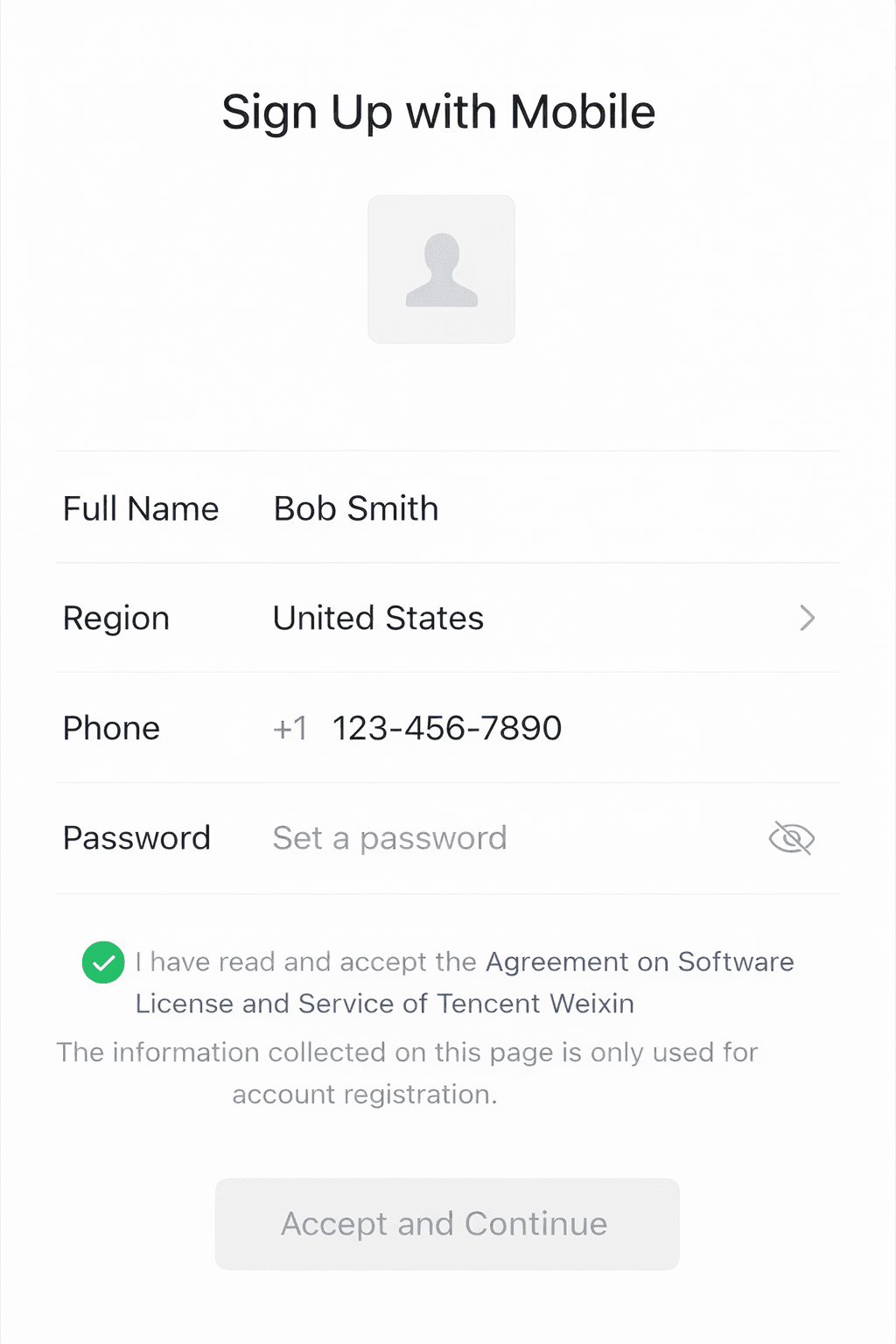
Register with your phone number and complete account setup.
Step 2Complete Verification
Complete Verification
New WeChat accounts may be asked to complete additional security verification before wallet and payment features become available.
This step helps WeChat confirm that your account can safely use wallet and payment functions.
Follow the in-app security verification process if prompted.
WeChat may ask for QR verification, friend verification, or another account check.
Complete verification before trying to use wallet or payment functions.
- Verification requirements can vary, so the exact flow may look different from one account to another.
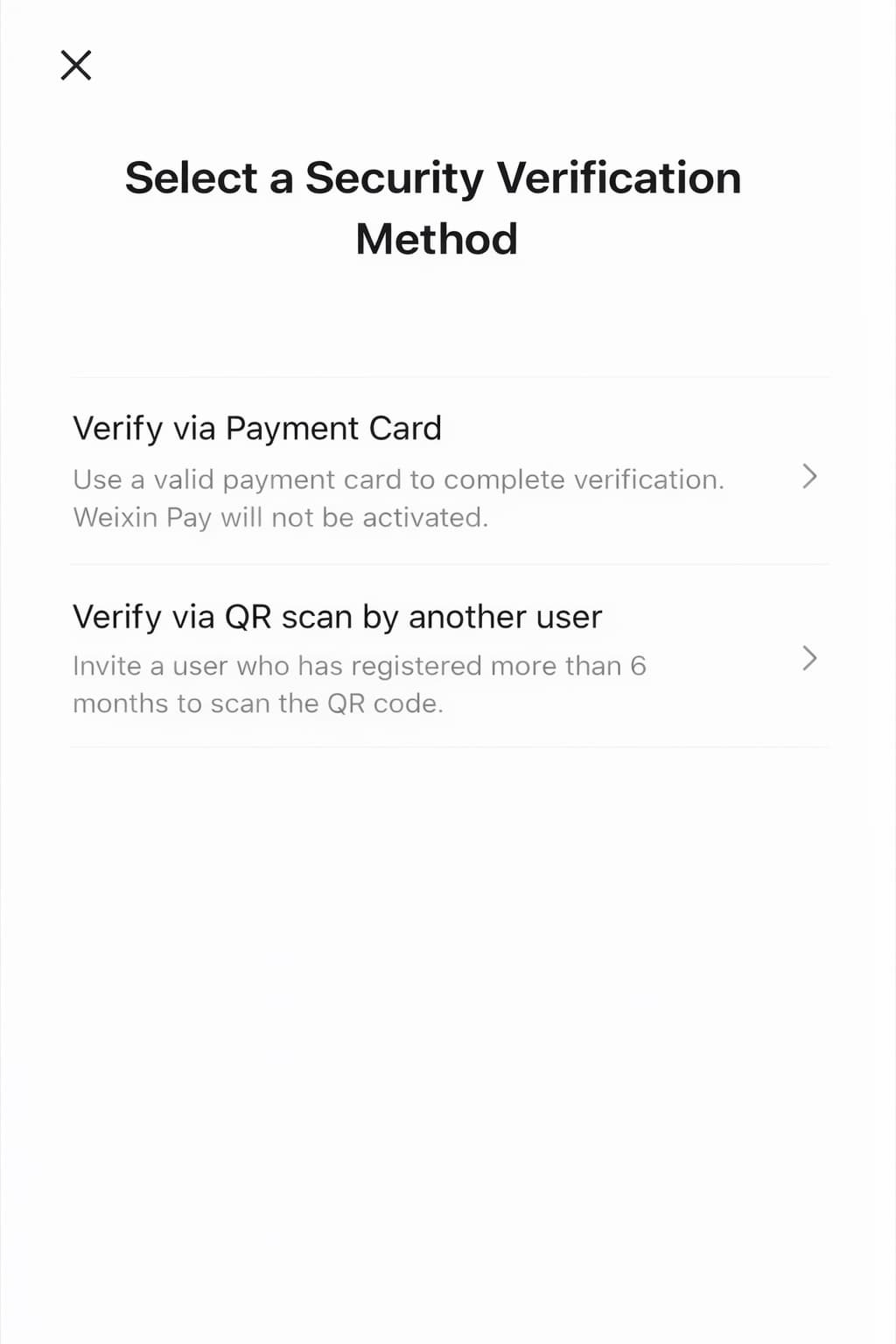
Example of a WeChat security verification screen.
Step 3Add Your Bank Card
Add Your Bank Card
Open Services or Wallet, then add your international bank card if the option is available for your account.
Open Services or Wallet in WeChat.
Go to Cards or Bank Cards.
Tap Add Card.
Enter your card details and complete any required identity check.
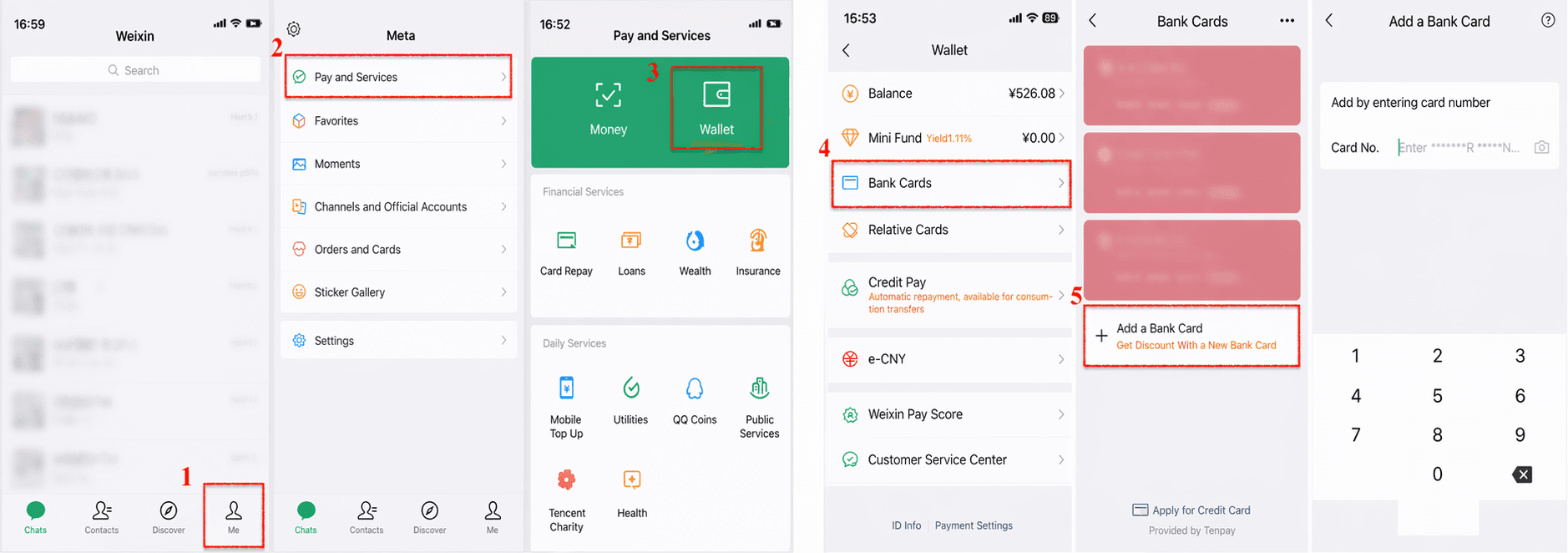
Open Services or Wallet and tap Add Card.
Step 4How to Pay with WeChat Pay
How to Pay with WeChat Pay
There are two common ways to pay with WeChat Pay in daily life.
Option A — Scan the QR
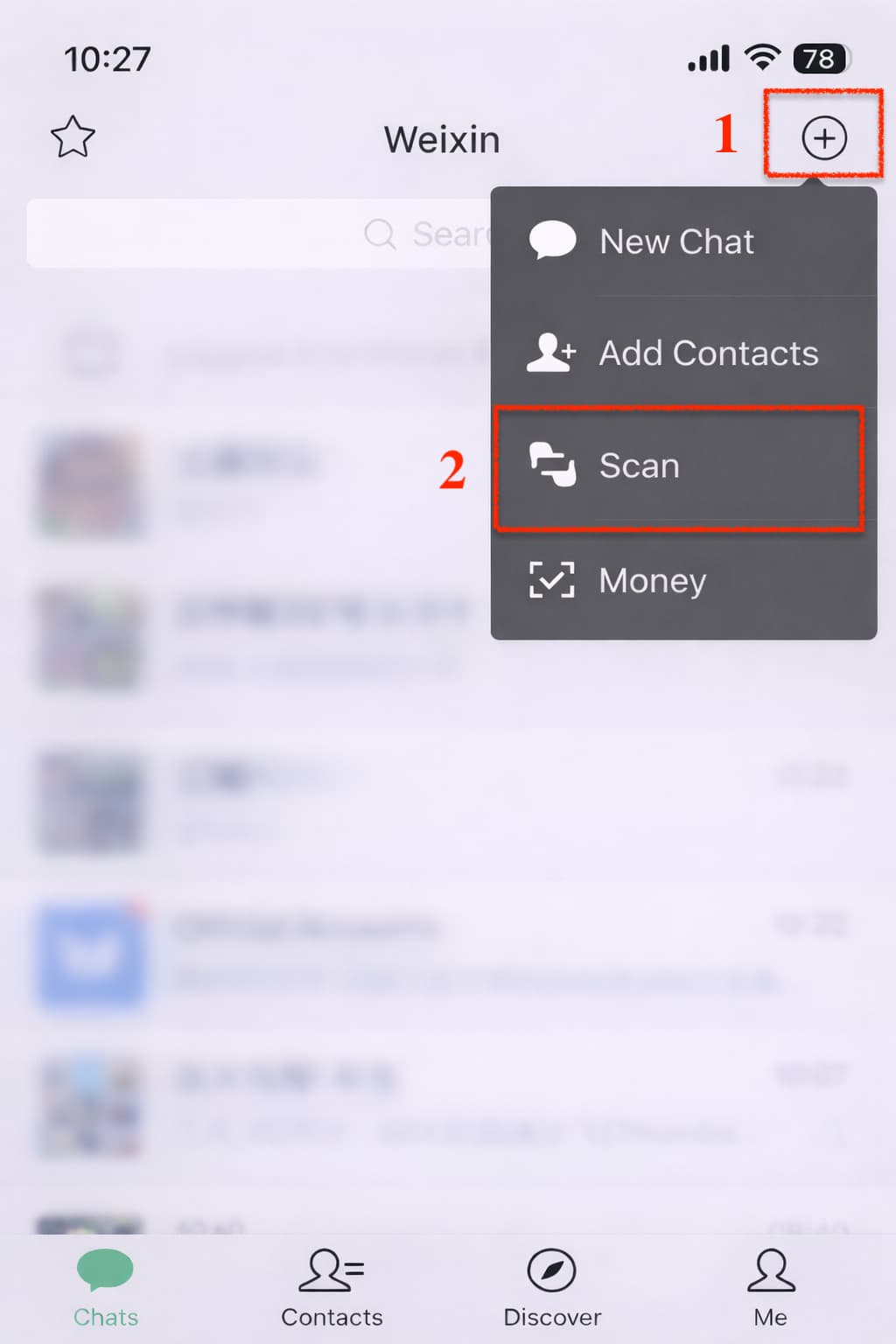
Tap Scan in WeChat, point your phone at the merchant’s QR code, enter the amount if needed, and confirm.
- Street vendors
- Small shops
- Temporary printed QR codes
Tap Scan to pay a merchant QR code.
Option B — Show your code
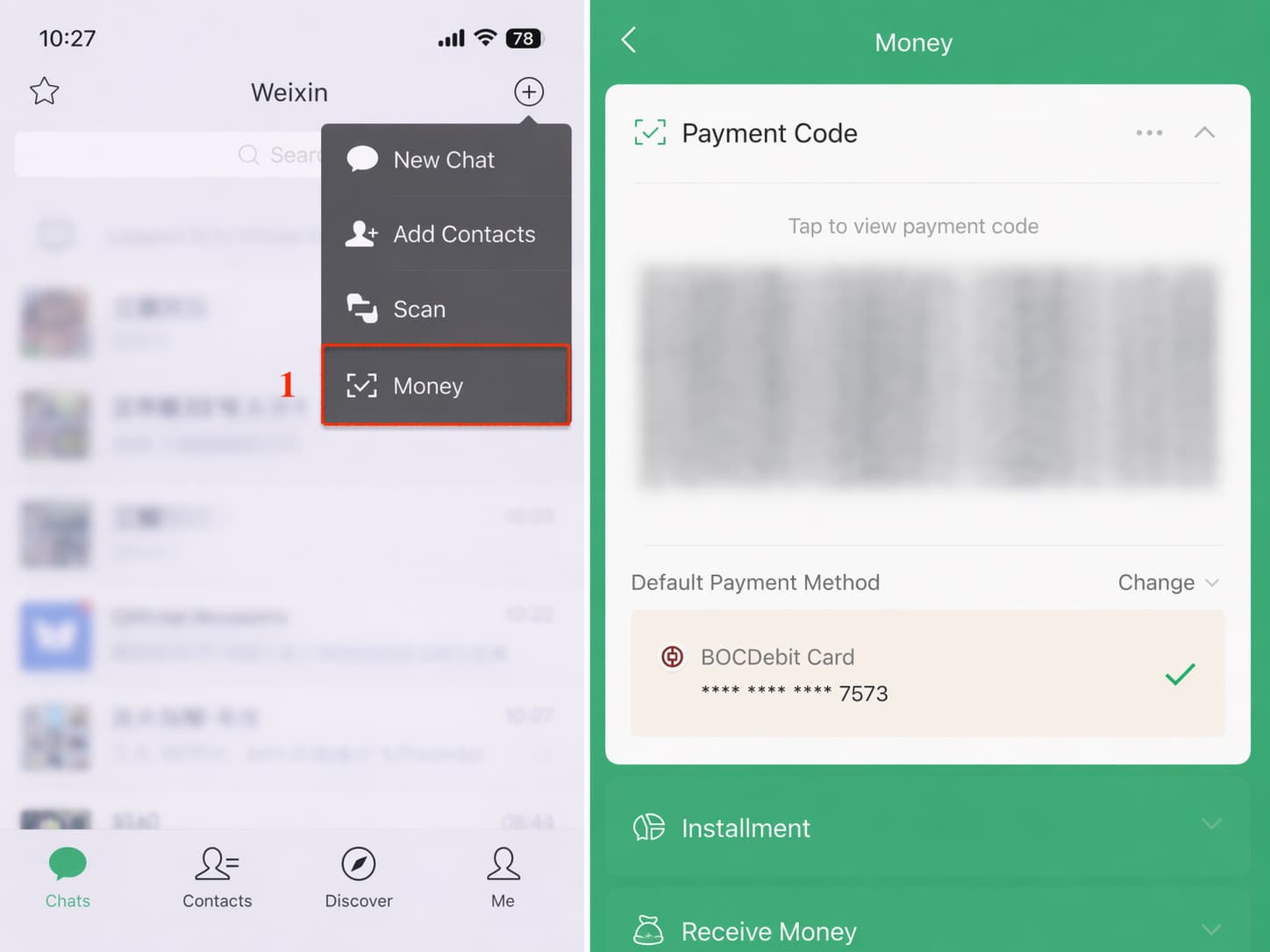
Tap Money or your payment code area, then show the QR or bar code to the merchant for scanning.
- Supermarkets
- Convenience stores
- Chain restaurants
Show your payment code and let the merchant scan it.
Download & Register
Download WeChat from the App Store or Google Play, then register with your phone number.
Search for WeChat in the App Store or Google Play.
Download and open the app.
Sign up with your phone number and follow the in-app registration steps.
- Your non-Chinese phone number may work for registration.
- WeChat account setup and verification flow can vary by account and region.
- WeChat Pay is often best used as a backup option alongside Alipay.
Register with your phone number and complete account setup.
Complete Verification
New WeChat accounts may be asked to complete additional security verification before wallet and payment features become available.
This step helps WeChat confirm that your account can safely use wallet and payment functions.
Follow the in-app security verification process if prompted.
WeChat may ask for QR verification, friend verification, or another account check.
Complete verification before trying to use wallet or payment functions.
- Verification requirements can vary, so the exact flow may look different from one account to another.
Example of a WeChat security verification screen.
Add Your Bank Card
Open Services or Wallet, then add your international bank card if the option is available for your account.
Open Services or Wallet in WeChat.
Go to Cards or Bank Cards.
Tap Add Card.
Enter your card details and complete any required identity check.
Open Services or Wallet and tap Add Card.
How to Pay with WeChat Pay
There are two common ways to pay with WeChat Pay in daily life.
Option A — Scan the QR
Tap Scan in WeChat, point your phone at the merchant’s QR code, enter the amount if needed, and confirm.
- Street vendors
- Small shops
- Temporary printed QR codes
Tap Scan to pay a merchant QR code.
Option B — Show your code
Tap Money or your payment code area, then show the QR or bar code to the merchant for scanning.
- Supermarkets
- Convenience stores
- Chain restaurants
Show your payment code and let the merchant scan it.
WeChat Pay FAQ for tourists
Common questions foreign visitors search before deciding whether to set up WeChat Pay.
Can tourists use WeChat Pay in China?
Yes, many tourists can use WeChat Pay after registering WeChat, linking an eligible international card, and completing any required verification.
Is WeChat Pay easier than Alipay for foreigners?
Usually no. Alipay is often easier to prioritize for first-time visitors, while WeChat Pay is useful as a backup and for WeChat mini programs.
Can I use WeChat Pay without a Chinese bank account?
Basic tourist payments may work with an eligible international card, but some wallet features can still be limited without a Chinese bank account or full verification.
Why is WeChat Pay asking for verification?
New WeChat accounts may need security or identity verification before payment functions become available. The exact flow can vary by account and region.
What should I do if WeChat Pay does not work?
Use Alipay first, try another card, check your mobile data and verification status, or keep cash and a physical card as backup.